Skip to main content
Support by Product
Tutorials
My Account
Submit a request
Sign in
English (United States)
Deutsch
Español
Français
日本語
Português
TechSmith Support
Snagit (Windows)
Tips & Workflows - Editor
Flip an Image in Snagit Editor
Updated
October 03, 2022 11:40
Problem
How do I flip an image in Snagit?
Solution
Open the
Snagit Editor
.
Open the image to flip.
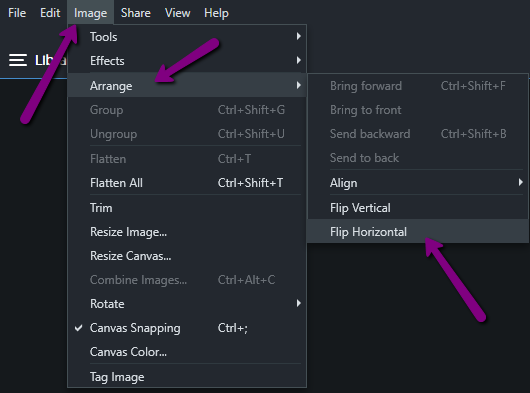
Click
Image > Arrange > Flip (horizontal or vertical)
.
Related Articles
Video Tip: How to Flip an Image
Return to top
Ask a question
https://support.techsmith.com/hc/en-us/categories/200174568
/hc/theming_assets/01JZJVYY7J50FJPSPTERD1981N
Buying and Licenses
Help articles on licenses, keys, downloads, purchasing and other common questions
custom
https://manage.techsmith.com/
/hc/theming_assets/01JZJVZN5GR92S222WV0HVYRBN
Go To My Account
Manage your subscriptions, locate saved software keys, and more
custom
https://support.techsmith.com/hc/en-us#kb
/hc/theming_assets/01JZJW0249QYRH9HQAQJP8VC6F
Support by Product
Technical Support knowledge base articles by product
custom
https://support.techsmith.com/hc/en-us/requests/new
/hc/theming_assets/01K0S2SHYMV0MK306JB9TW3R2B
Get Help
Get in touch with our dedicated team of Support Specialists.
activate software, crashing, need software key